Markdown to Word
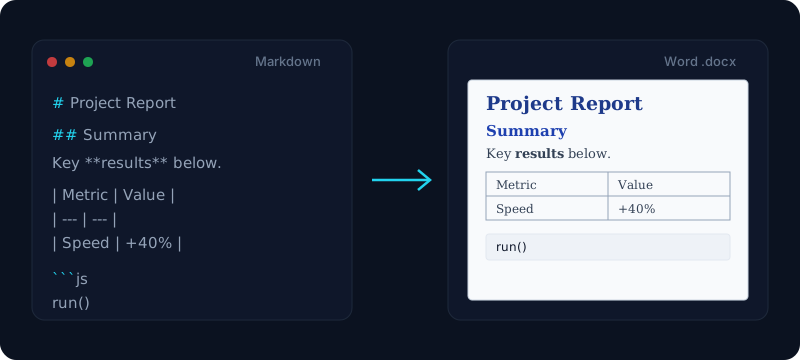
Convert Markdown into a clean, editable Word document — headings, tables and code preserved as native Word styles.
Output preview will appear here after you convert.
Free & client-side. Your files are never uploaded.
Paste Markdown and download a real Word document — not a flat text dump. This free converter maps your headings to native Word heading styles, keeps GitHub-Flavored tables as proper editable Word tables, and preserves lists, blockquotes, code blocks, links, and inline formatting. Open the .docx in Microsoft Word, Google Docs, or WPS and everything is still structured, so you can keep editing, restyle with a theme, or navigate with the outline view.
Because the conversion runs entirely in your browser, your document never leaves your machine — there is no upload, no server round-trip, and nothing to install. It is the fast, private way to turn a README, an AI-generated draft, or a batch of notes into a polished .docx you can hand to a colleague. Under the hood it produces genuine Office Open XML, which is why the md to word output opens flawlessly across modern office suites instead of looking like pasted HTML.
If you have seen this tool called a markdown to docx or md to docx converter, it is the same thing: .docx is simply the file extension of a modern Word document, so to convert md to word is to convert Markdown to docx. Whether you want to convert a markdown file to word, a single README, or a whole folder of notes, the steps are identical — paste or open the Markdown, preview the result, and download the Word document.
How it works
- 1
Paste your Markdown (or open a .md file) into the box.
- 2
Click Convert — the .docx is built entirely in your browser.
- 3
Preview the result, then download a Word file for Word, Google Docs or WPS.
Why use this converter
- Headings map to native Word heading styles (works with the outline view)
- GitHub-Flavored tables become real, editable Word tables
- Lists, blockquotes, code blocks and inline formatting all preserved
- No upload — the document is generated entirely client-side
Use cases
Hand technical docs to non-technical reviewers
Turn a README or spec written in Markdown into a Word file colleagues can open, comment on, and track changes in — without ever seeing raw syntax.
Turn AI-generated Markdown into a formal report
Take Markdown from Claude or ChatGPT and convert md to word in one click — a clean .docx report with proper headings and tables, ready for submission or sharing.
Export notes and papers for feedback
Convert lecture notes, lab reports, or a draft paper from Markdown to Word so a teacher or editor can mark it up in a familiar tool.
Frequently asked questions
Is this Markdown to Word converter free?
Yes — it is completely free with no signup, no watermark and no limits. The markdown to word conversion runs entirely in your browser, so you can convert as many files as you like.
Is "markdown to docx" the same as "markdown to word"?
Yes. A Word document uses the .docx extension, so a markdown to docx (or md to docx) converter and a markdown to word converter do exactly the same job. This tool takes your Markdown and produces a standard .docx file — however you searched for it, you are in the right place.
Is it safe? Are my files uploaded?
Nothing is uploaded. The .docx is built locally in your browser and never sent to a server, so even confidential documents stay on your device.
What Markdown syntax does it support?
Headings (H1–H6), bold, italic, strikethrough, ordered and unordered lists, task lists, GitHub-Flavored tables, blockquotes, links, horizontal rules, inline code and fenced code blocks are all converted to matching Word structures.
Can I open the Word file in Google Docs or WPS?
Yes. The output is a standard .docx (Office Open XML), so it opens cleanly in Microsoft Word, Google Docs, WPS Office and any modern word processor — and stays editable.
Is there a file size limit?
The tool is tuned for typical documents up to a few megabytes so conversion stays instant. Very large files still work but take a moment longer to build.
What about LaTeX math and Mermaid diagrams?
Basic Markdown, tables and code convert with full fidelity. Complex LaTeX math and Mermaid diagrams are still evolving — for diagrams, render them first with our Mermaid tools. Plain code and text always carry across.
What's the difference between .docx and .doc?
This tool exports .docx, the modern Office Open XML format. Compared with the older .doc binary format, .docx files are smaller, more robust, and compatible with Office 365, Google Docs and other current editors.
Can I convert a Word document back to Markdown?
This tool handles the Markdown to Word direction. A Word to Markdown converter is on the roadmap — for now, paste Markdown here to get a clean, editable .docx.