Markdown Table Generator
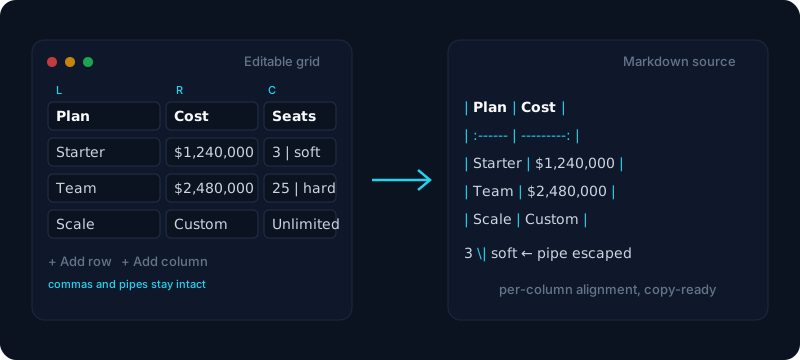
Build a table in the grid, or paste the rows you already have — spreadsheet cells, a CSV, a table copied off a web page, even an existing Markdown table. The GitHub-Flavored pipe table appears on the right, ready to copy.
Type into the grid — or just paste: a block of cells from a spreadsheet, a CSV, a table copied off a web page, or an existing Markdown table.
| Plan       | Monthly cost | Seats \| included |
| :--------- | -----------: | :---------------: |
| Starter    | $1,240,000   | 3 \| soft cap     |
| Team       | $2,480,000   | 25 \| hard cap    |
| Enterprise | Custom       | Unlimited         |
Free & client-side. Your files are never uploaded.
Writing a Markdown table by hand goes wrong in small ways: you count the pipes, you count the dashes, you forget the separator row needs its own line, and then one cell contains a comma or a pipe and the whole thing collapses into punctuation. This generator takes that away — click a cell, type, press Tab, add a row when you need one. The finished GitHub-Flavored Markdown appears on the right as you type, already aligned and already escaped.
The faster path is usually not typing at all. Most tables already exist somewhere — a range in a spreadsheet, a CSV export, a table on a docs page, or one an AI assistant just handed you. Paste any of those and the rows land in the right columns, because the tool reads what is actually on your clipboard and picks the matching parser. If it cannot be read as a table you get a message saying what was expected, never a silently empty pane.
The output is where it pays to be fussy. Cells containing a pipe are escaped once, not twice. A value like $1,240,000 stays in one cell instead of splitting on its commas. Each column can be left, centre or right aligned, and that alignment survives a round trip — paste a finished table back in and it returns to editable cells with its alignment intact. For a whole .csv file at once, use CSV to Markdown; for the reverse, Markdown Table to CSV. Table syntax itself is covered in the Markdown syntax guide.
How it works
- 1
Type into the grid, or paste rows from a spreadsheet, a CSV, a web page table, or an existing Markdown table.
- 2
Add or delete rows and columns, and click a column’s alignment button to cycle left, center, right, or unspecified.
- 3
Copy the Markdown to your clipboard, or download table.md — nothing is uploaded.
Why use this converter
- Visual grid with add/delete row and column
- Per-column alignment — left, center, right or unspecified
- Paste a spreadsheet range, quoted CSV, HTML table, or an existing Markdown table
- Escapes pipes and converts in-cell line breaks to <br>
- Pretty-aligned or compact output, copy or download .md
Use cases
Make a table for a README from scratch
Type straight into the grid, add rows as the list grows, and set each column's alignment — the Markdown source updates on every keystroke, so no blank page and no hand-typed pipes.
Edit a Markdown table you already wrote
Paste an existing pipe table back in and it parses into editable cells with per-column alignment intact — fix a typo, add a column, then copy it back where it came from.
Paste rows straight from a spreadsheet
Copy a range in Sheets, Numbers, or Calc and paste — tab-separated values land in the right cells, and a price like $1,240,000 stays in one cell instead of splitting.
Turn a web page table into documentation
Select a rendered table in your browser, copy, and paste it here to get clean Markdown — the HTML structure is read directly, so headers and rows survive the trip.
Related reading
Frequently asked questions
How do I create a Markdown table?
Fill in the grid: type your headers, add rows as you need them, and set each column to left, centre or right. The GitHub-Flavored Markdown builds on the right as you type — copy it when you are done.
How do I make a table in Markdown without typing pipes?
Use the grid instead of writing the syntax by hand, or paste rows in from a spreadsheet. Either way the pipes, the separator row and the padding are generated for you.
Can I paste an existing Markdown table back in to edit it?
Yes. Paste a finished pipe table and it is parsed back into editable cells, with the per-column alignment read out of the separator row — so a column that was centred stays centred.
What happens to a pipe character inside a cell?
It is escaped as \| so the cell survives instead of splitting the row. The escape is applied exactly once, even for text pasted from a web page.
What if a cell contains a line break?
It becomes a <br> tag, which is how GitHub-Flavored Markdown renders a line break inside a table cell. A raw newline there would end the row early.
Can I paste rows copied from a spreadsheet?
Yes. Sheets, Numbers, Excel and Calc all put tab-separated values on the clipboard, and those land straight in the right cells — no save-as or export step.
Will a value like $1,240,000 break into two columns?
No. The delimiter is detected across several rows rather than guessed from the first one, so a currency value or an address with a comma stays in the cell it belongs to.
How do I set per-column alignment (left, center, right)?
Each column header has an alignment control. It writes the colons in the separator row for you — :--- for left, :---: for centre and ---: for right.
Why does my table not show up as a table?
Usually the separator row is missing or the pipe count does not match across rows. Copying the generated output avoids both; if a paste cannot be read, you get a message saying what was expected.
Is my data uploaded anywhere?
No. The table is built in your browser and nothing is sent to a server, so you can paste internal or unreleased data without it leaving your machine.
Can I convert the table to CSV or HTML instead?
Yes — use Markdown Table to CSV for spreadsheets, or Markdown to HTML for a page. To go the other way from a .csv file, use CSV to Markdown.