Markdown to Text
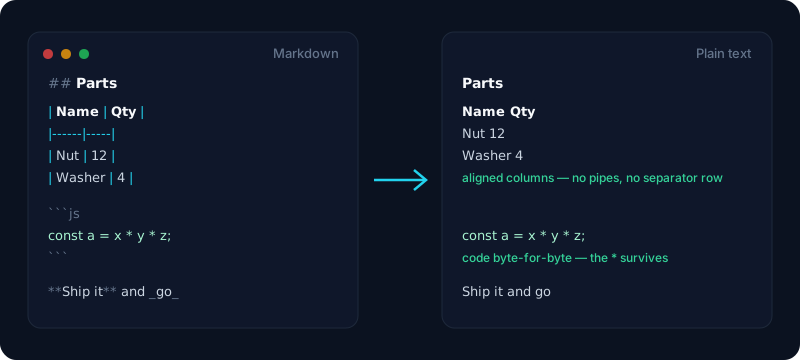
Paste Markdown — ChatGPT output, a README, release notes — and get clean plain text. Tables come out as aligned columns, code blocks stay byte-for-byte intact, and front matter is removed.
Paste Markdown — ChatGPT or Claude output, a README, release notes. YAML front matter is stripped and code blocks are left byte-for-byte alone.
Plain text output
Your plain text will appear here as you paste Markdown.
Free & client-side. Your files are never uploaded.
This free tool removes Markdown formatting and leaves you with clean plain text. Headings lose their hash marks, bold and italic markers disappear, links collapse to their label, images come through as their alt text, and horizontal rules vanish without leaving a trail of dashes behind. Blank lines between paragraphs survive, so prose still reads like prose instead of collapsing into one dense wall of words.
The difference is in what survives. Most strippers run regular expressions over the whole document, so an asterisk inside code gets eaten: the line const a = x * y * z; comes back as x y z, and snake_case_name is flattened to snakecasename. This tool walks the parsed document tree instead, so code spans and fenced blocks never enter emphasis matching at all. GFM tables become aligned text columns rather than leaking raw pipes, and YAML front matter is dropped instead of leaking a stray title line.
A few limits worth stating plainly. In running prose, 2*3*4 becomes 234, because CommonMark really does read the middle as italics and plain text has no way to say otherwise. Footnote markers are left as they are, LaTeX math is passed through untouched, and nested list indentation is preserved rather than flattened. Need the markup kept and rendered instead? Use Markdown to HTML. The markers themselves are explained in the Markdown syntax guide.
How it works
- 1
Paste your Markdown, or open a .md / .markdown / .txt file.
- 2
Choose whether to keep link URLs, how tables should look, and whether list markers stay.
- 3
Copy the plain text to your clipboard, or download output.txt.
Why use this converter
- Code blocks and inline code come through byte-for-byte
- Tables become aligned text columns, not leaked pipes
- YAML and TOML front matter is removed, not leaked
- Nested lists, ordered numbers and task state all preserved
- Runs entirely in your browser — nothing is uploaded
Use cases
Clean up ChatGPT and Claude output
AI assistants answer in Markdown, so paste their reply here to drop the stray asterisks and hash marks before it goes anywhere else.
Paste into a plain-text-only field
Email clients, CRM notes, support tickets, form fields and SMS all show raw Markdown markers as literal characters, so strip them first.
Turn a README into readable plain text
Flatten project documentation for a changelog, a word count, a release email or any place that cannot render Markdown at all.
Related reading
Frequently asked questions
How do I strip Markdown formatting from text?
Paste the Markdown into the box on the left and the plain text appears on the right as you type. Adjust the three options if you want link URLs kept or tables as tab-separated values, then click Copy text or download output.txt.
Does it keep link URLs?
By default no — a link comes through as just its label, which is what most people want when flattening prose. Turn on Keep link URLs and you get the label followed by the address in brackets instead, so nothing is lost.
What happens to tables?
A GFM table is rebuilt as aligned plain-text columns: no pipe characters, no separator row of dashes, and each column padded so the values line up when read in a monospaced font. Switch to Tab-separated if you would rather paste the result into a spreadsheet.
Are code blocks safe?
Yes, and this is the main thing regex-based strippers get wrong. They treat an asterisk in code as italics, so const a = x * y * z; comes back as x y z. Here code content never enters emphasis matching, so it is reproduced exactly as written.
What about YAML front matter?
The block fenced by three dashes at the top of a file is removed entirely, along with the TOML variant fenced by plus signs. Many tools mistake it for a heading and leak a stray title line into the output; this one does not.
Is anything uploaded?
No. The whole thing runs as JavaScript inside your browser, so your document never touches a server and nothing is logged. That makes it safe for internal docs, client notes and anything else you would not paste into a remote converter.
Can I do this in code?
Yes. Install the marked package, call marked.lexer(src) to get the token tree, then walk it and emit the text fields, reading code tokens straight through rather than running regular expressions over them. That tree walk is exactly what this page does.
Are there cases it cannot get right?
A couple, stated honestly. In prose, 2*3*4 becomes 234 because the specification really does read the middle as italics. Footnote markers stay as written, and a pipe character inside a table cell is split by the parser before we see it.