Markdown Resume & CV Builder
Write your resume in Markdown, pick a clean ATS-friendly theme, and export a polished, print-ready PDF — free, and entirely in your browser. Your resume is never uploaded.
Free & client-side. Your files are never uploaded.
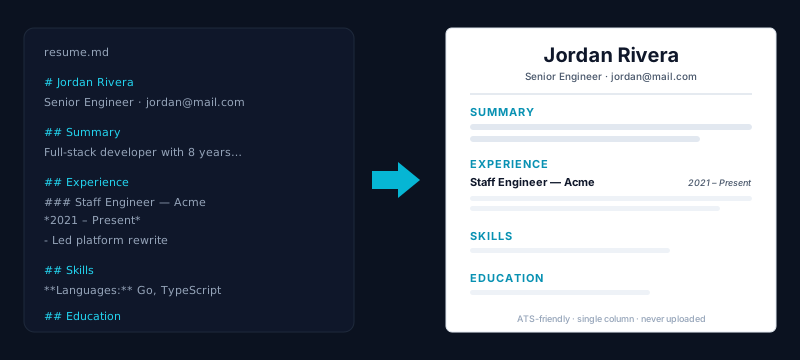
Build a resume the way developers like to work: in plain Markdown, versionable and distraction-free, then export a clean PDF that looks designed. This free tool turns your Markdown into a polished, single-column resume — the layout applicant tracking systems (ATS) parse most reliably — and lets you switch themes, fonts, and spacing live before you export. No Word styling to fight, no template lock-in, just your content and a professional result. Whether you call it a resume or a CV, the same tool covers both.
The biggest difference from other online resume builders is privacy: everything runs in your browser and your resume is never uploaded to a server. Your name, contact details, and work history stay on your device — which matters a lot more for a resume than for an ordinary document. Your draft is also saved locally as you type, so you can close the tab and pick up where you left off without an account, a login, or a paywall.
When it looks right, export a PDF in one click, or use Print / Save as PDF for a version with selectable, searchable text. The output is ATS-friendly by design: a single-column layout, real text (not an image), and standard fonts, so both the human recruiter and the resume-screening software can read it. Need to convert an existing Word document into Markdown first? Our Word to Markdown tool does that; to go from Markdown to a plain PDF, use Markdown to PDF.
How it works
- 1
Write your resume in Markdown (or start from the built-in example).
- 2
Pick a theme — Classic, Modern or Compact — and see the preview update live.
- 3
Click Download PDF, or Print / Save as PDF for selectable, searchable text.
Why use this converter
- ATS-friendly single-column themes — parsed reliably by resume screeners
- Three resume themes (Classic serif, Modern, Compact) switchable live
- Your resume is never uploaded — everything runs in your browser
- Auto-saves your draft locally — no account, close and come back
- Export a one-click PDF or a searchable, selectable-text PDF
Use cases
Write and maintain your resume in plain text
Keep your resume in version control as a Markdown file, edit it in seconds, and re-export a fresh PDF whenever you apply — no wrestling with Word styles.
Export an ATS-friendly PDF that gets parsed
Use a single-column theme with real text so applicant tracking systems read your experience correctly instead of garbling a multi-column design.
Build a CV without handing your data to a server
Your resume never leaves the browser — write, theme, and export a CV full of personal details with nothing uploaded and no account required.
Frequently asked questions
Is this Markdown resume builder really free?
Yes — completely free, with no signup, no watermark and no paywall. You can write, theme, and export as many resumes as you like. The whole thing runs in your browser.
What is the difference between a resume and a CV?
In the US, "resume" means a short one-to-two-page summary for a job application; in the UK, Europe and academia, "CV" (curriculum vitae) means much the same thing for most roles (though an academic CV can be longer). This tool builds either — write your content in Markdown and export the PDF, whichever term you use.
Is the exported resume ATS-friendly?
Yes. All themes use a single-column layout with real, selectable text and standard fonts — the format applicant tracking systems parse most reliably. Avoiding multi-column designs and text-as-image is exactly what keeps your experience readable to the software that screens resumes.
Is my resume uploaded anywhere?
No. Your resume is rendered and turned into a PDF entirely in your browser, and nothing is sent to a server. That privacy matters more for a resume than for a normal document, since it holds your name, contact details and work history.
Will my draft be saved if I close the tab?
Yes. Your resume content and chosen theme are saved locally in your browser as you type, so you can close the tab and return later to keep editing — no account needed. Clearing your browser data will remove the saved draft.
Can I get a PDF with selectable, searchable text?
Yes — use Print / Save as PDF, which produces a vector PDF whose text you can select, copy and search. The one-click Download PDF reproduces the themed layout as a crisp file. Both are ATS-readable because the text is real text.
What Markdown should I use for a resume?
Use a top-level heading for your name, a line under it for contact details, and second-level headings for sections like Summary, Experience, Skills and Education. The built-in example shows the structure — edit it and the preview updates live.